Category Archives: Web apps

Reactor Networks & React

I realized that the Reactor Networks web lab would be a candidate for converting to a React app. In this lab, web elements such as CSTRs and PFRs are added and removed from the web page. React’s self-contained components, which can be added and removed from the DOM, are designed for this purpose. At this point, I have decided to stick with plain Javascript and my current approach, which is similar to what React does.

In the current approach, functions that create a component such as a PFR are contained in separate JS files. When called, a function returns a template string (template literal) with the HTML that labels and displays the components. The standard JS function insertAdjacentHTML is used to add this component to the DOM. No external data is involved, so this is safe. The standard JS function remove is used to delete the component.

Please send us a message letting us know what you think at support@reactorlab.net

TypeScript and React in the development of web pages and apps

Reactor Lab’s Web Labs are written with plain HTML/CSS/Javascript with only the jQuery library and a plotting library added. Many web sites and apps are built using TypeScript and React. I used Claude AI to help me write an explanation of these tools.

TypeScript is a way to declare values in Javascript as to type, that is, what kind of value it is (function, number, boolean, string, array, etc.) and what operations can be performed on it. Declaring value types is a way to help avoid runtime errors.

JavaScript written with TypeScript is saved in .TS files. A TypeScript compiler continuously checks for type errors while compiling .TS files into standard JavaScript files that can be executed by a web browser alongside the project’s HTML and CSS files.

CSS files are written and handled normally when developing with TypeScript or React.

React enables building complex user interfaces (UI) by composing simple, self-contained components. These components encapsulate UI structure, state, and behavior, and can be reused within a project or shared across multiple projects.

React code in development is written using JSX, a JavaScript syntax extension that looks like HTML/XML embedded in JavaScript. React code is saved in .JSX files.

TypeScript and React can be used independently or can be used together. When TypeScript is used along with React, the code is saved in .TSX files.

The .TSX and .JSX files are run through a transpiler that processes the files and outputs standard Javascript files that can be run in a web browser. A short index.html file loads the Javascript files. In practice, modern build tools like esbuild or Vite handle both TypeScript compilation and JSX transpilation in a single step.

The Javascript files output by the transpiler contain calls to functions in the React runtime Javascript library, which is downloaded by the browser along with the other files in the project. The React runtime library handles the UI display by manipulating the Document Object Model (DOM), such as adding divs and buttons, etc., based on component state changes.

Please send us a message letting us know what you think at support@reactorlab.net

Intro to Web Labs

This is from the first page of the Web Labs wiki on our Github site:

Web Labs is a project of ReactorLab.net. Our purpose is to provide labs which help people understand physical systems through active participation.

Many of the labs are interactive simulations of the type “continuous simulation” or “system dynamics simulation.” In this type of simulation, the system evolves continuously as simulation time proceeds. The user can change input parameter values during evolution of the system, thus changing the simulation results.

Some labs are not dynamic but provide one set of outputs with each experiment. Labs 13-15 and 16-18 are like this.

A lab is composed of one or more JavaScript objects representing process units. Each process unit object contains data describing its current and past state, and methods which provide for changes in the unit’s state as simulation time proceeds. A process unit may exchange data with other process units.

In Dynamic labs, simulation time proceeds in incremental steps. At each step, all process units update their inputs from other units, then update their own state based on their current state and the state of the other units from which they get inputs. The methods by which units update their state involve algebraic and ordinary differential equations, and also may involve partial differential equations. This method of stepping in time is the Euler method of approximate solution of ordinary differential equations. Web Lab’s approximate solutions should not be used to design actual systems.

Design Philosophy

We are developing the Labs using plain JavaScript, with few or no libraries.

We construct labs using one or more “process units” which are independent objects but which can send and receive data from each other. This independence allows new labs to be constructed by using existing process units from old labs and adding new units. This is an example of modular simulation.

We have tried to make the code easy to read and understand. Because of this reason, relatively many lines are used to specify lab units and plot info.

For example, in process_plot_info.js there are many lines like this to specify a plot:

plotInfo[pnum]['xAxisShow'] = 1; // 0 false, 1 true
plotInfo[pnum]['xAxisMin'] = 0;
plotInfo[pnum]['xAxisMax'] = 1000;
...
etc.

And in a process unit’s initialize method, variables are specified like this:

initialize : function() {
//
let v = 0;
this.dataHeaders[v] = 'k_300';
this.dataInputs[v] = 'input_field_RateConstant';
this.dataUnits[v] = '(units depend on order)';
this.dataMin[v] = 0;
this.dataMax[v] = 1000;
this.dataDefault[v] = 1.0e-7;
//
v = 1;
...
etc.

The specifications could be shortened by loading values as indexed elements into a single array. That, however, would make the code more difficult to read and write.

While our strategy does result in more lines of code, they don’t all have to be typed separately, with use of copy, paste and edit.

Please send us a message letting us know what you think at support@reactorlab.net
Design your own reactor network in Web Labs

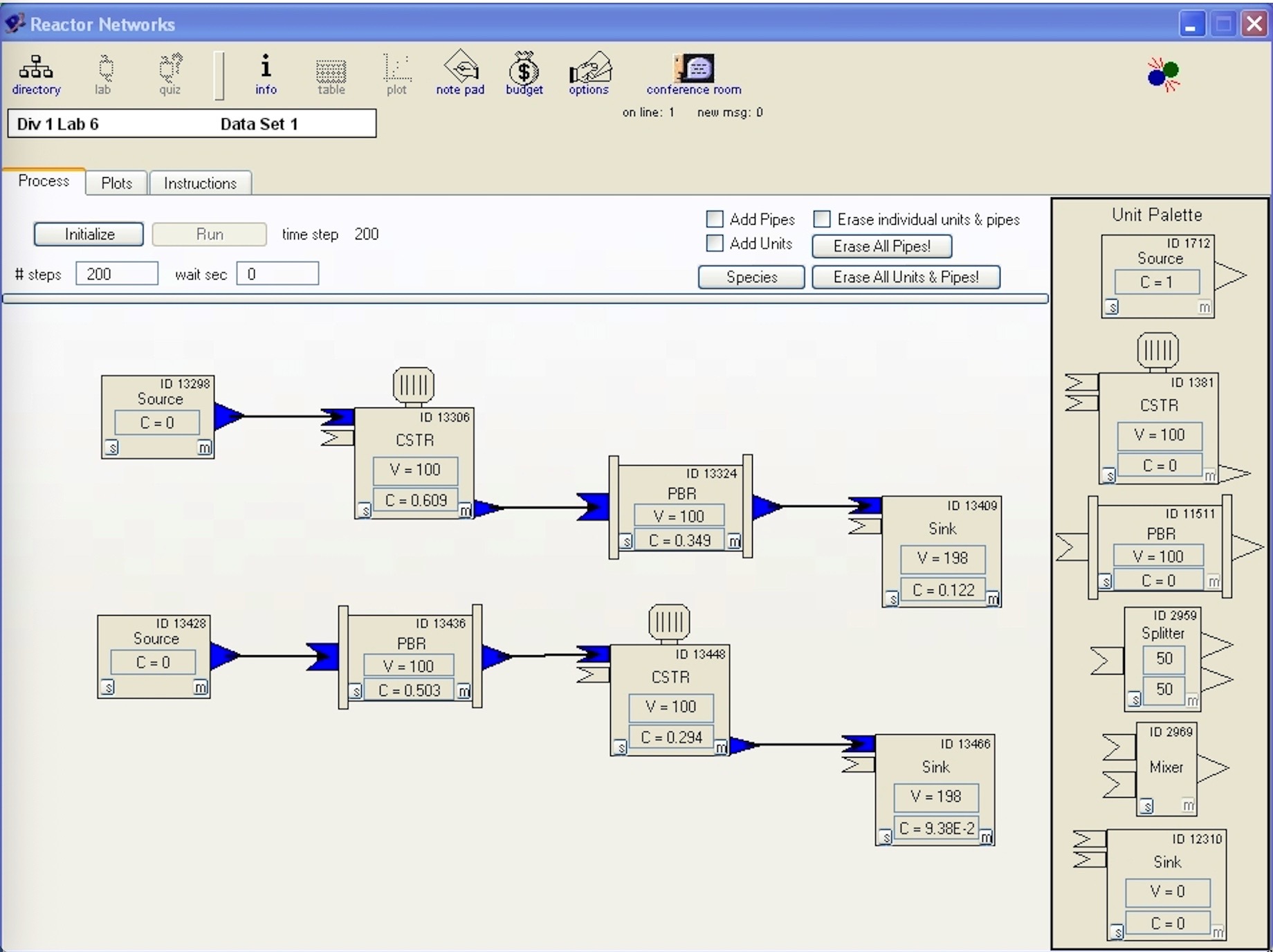
The desktop version of Reactor Lab had a lab that allowed you to design a reactor network with units that you selected and placed on a flowsheet. See our Annual report 2005 at the Desktop Lab tab above. That desktop version was built with the development tool LiveCode. If you have a LiveCode subscription, you can run a copy of the desktop Lab you download from our github site.

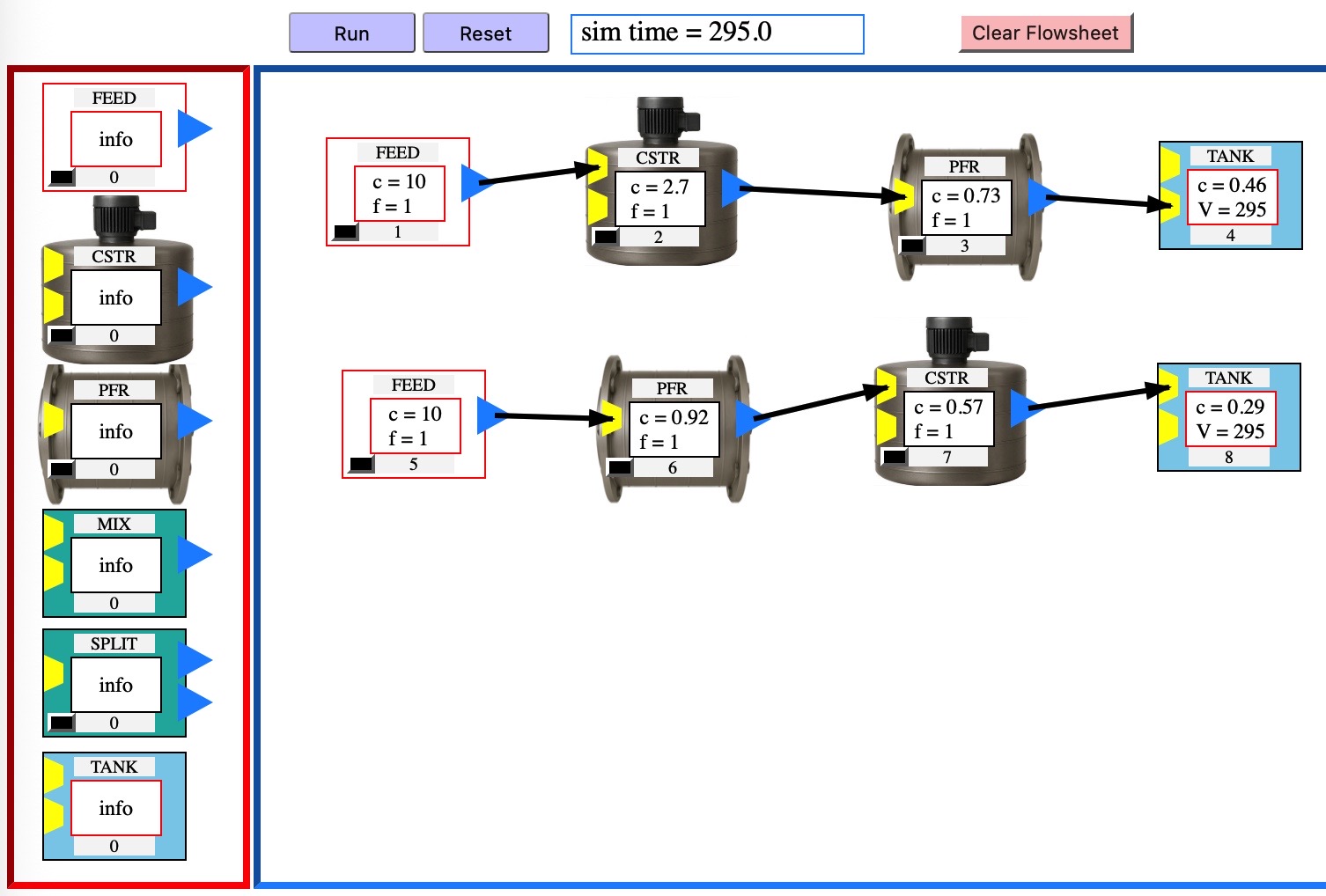
We are focusing on our Web Labs, now that we no longer support the desktop version. Today we posted our web version of the networks lab at the Web Labs tab, Reactors, Reactor Networks lab.

This web version was built with simple Javascript with no added libraries. It works by inserting and removing html code linked to Javascript objects as units are added and deleted from the flowsheet. This lab is less complex than apps which also build flowsheets, such as Aspen Plus and COCO, but this lab is easy to use to gain basic understanding of reactors and system dynamics.

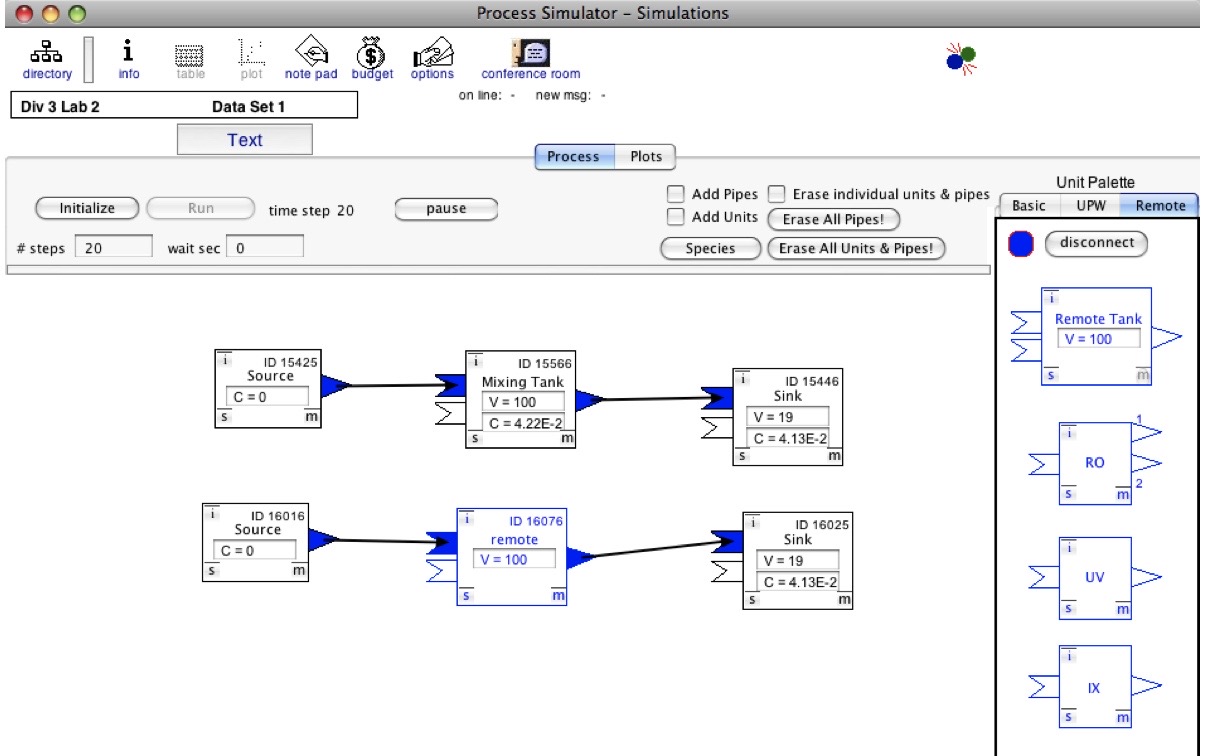
Below are three screenshots: one from the new Web Lab (top) and two from the desktop Lab. In the bottom screenshot, you can see a reactor network that utilizes both local desktop units and remote units, where the local and remote units exchange messages over the Internet during a dynamic simulation.

Please send us a message letting us know what you think at support@reactorlab.net
Reactor Networks in Reactor Lab's Web Labs
Reactor Networks in Reactor Lab’s Web Labs (2025)
Reactor Networks in the Desktop Reactor Lab, circa 2005
Reactor Networks in the Desktop Reactor Lab (2005)
Reactor Networks in desktop Reactor Lab
Reactor Networks in desktop Reactor Lab exchanging messages with remote unit on Internet during dynamic simulation (2009)

What happened to the desktop Lab?

As of July, 2022, I am no longer providing downloads of the desktop versions of our software.

After retiring from the university eight years ago, I stopped maintaining the desktop (standalone, executable) versions for several reasons.

The main reason is that web technology has developed to the point that interactive web apps can be written once, then distributed and run on all varieties of mobile devices and computers. One important development has been the dramatically increased speed of Javascript in web browsers, which enables fast computation and graphics animation.

Another reason is that I have chosen not to spend the cost in time and money required to update and build desktop executables for multiple operating systems, as the versions of our development tool, LiveCode, and operating systems change.

The source code of our desktop software is posted at our GitHub site.

Please see our Web Labs, for which the source code is also posted at our GitHub site.

Please send us a message letting us know what you think at support@reactorlab.net
Links to external sites open in new browser tabs.

Web Lab development update

We now have six web labs posted. The newest is the dynamic heat exchanger simulation, and we recently updated the code structure of the reaction-diffusion lab and first temperature control lab to match the newest version.

In addition to the jquery and flot (plotting) libraries, each web lab is driven by six javascript files: (1) _main which runs the simulation loop, (2) _interface which handles the run-pause and reset buttons and gets and verifies inputs from the input fields, (3) _units which has simulation parameters and the process unit code, (4) _plot_info which contains definitions of the plots, (5) _plotter which makes the profile (static x,y) and strip chart (scrolling x,y) plots, and (6) _spacetime which makes the space-time, color-canvas plots.

Four of the six files are the same for all web labs. The two files specific to an individual web lab are the (3) _units and (4) _plot_info files.

We are amazed with the fast computational speed of javascript! Somewhere recently I read that the speed of javascript in browsers has increased by a factor of ten in the last year and a half. Years ago, computation in LiveCode (as MetaCard) was many times faster than javascript. Now, computation in javascript for our labs is much faster than native LiveCode script, although LiveCode 9 makes coupling to other languages for computation possible.

A feature unique to the heat exchanger lab is a check for attainment of steady state. When no significant changes to the system state are detected, the main simulation loop continues to run but unit computations and display updates cease until a change in input parameters is detected. When steady state is reached, the CPU load of the simulation decreases significantly. We don’t plan to implement this for the reaction-diffusion and temperature control labs because these usually operate under unsteady-state conditions.

The code is developing over time as we follow our usual development practice, which is repeat the following: (1) get something working, (2) notice repetition, (3) reduce repetition by writing functions and common library files.