Category Archives: Design

Solving the Magic Hexagon Puzzle

First, start with the hint to solve the Magic Hexagon Puzzle. Without the hint, there are ten quadrillion ways to place 19 tiles in the array. The hint gives you the locations of six tiles. Now, with the hint, there are still over six billion ways to place 13 tiles, a large reduction but still too many for our slow hands and short lives!

So next, you are going to have to use some logic in solving the puzzle. My strategy was to solve the 3-tile rows on each of the six sides of the hexagon. Next, I placed tiles in the two 4-tile horizontal rows, and lastly in the middle 5-tile horizontal row. On my first try, I got all rows solved, except for three contiguous diagonal rows. The middle one of these rows had a sum that was too high by 4, with each of the two neighboring rows too low by 2. I suspect a couple swaps between these three rows would have obtained a complete solution, were I to have continued. Starting again on another day, I was able to solve the puzzle. So it can be done.

There are references to this puzzle’s history (and solution) on the web. From Wikipedia’s article Magic Hexagon, “The order-3 magic hexagon with numbers 1 through 19 and magic sum 38 has been published many times as a ‘new’ discovery. An early reference, and possibly the first discoverer, is Ernst von Haselberg (1887).” Wikipedia says that the order-3 magic hexagon has a unique tile-arrangement solution, and is the only ‘normal’ hexagon, which is one with sequential integer tile numbers starting at one. The article then describes several ‘abnormal’ magic hexagons with different lists of integer tile numbers.

In a side project, I sought a direct linear algebra solution to tile placement using the hint and Matlab. This turned out not to be possible because the coefficient matrix was very sparse and singular, and a solution couldn’t be obtained or approximated by any of Matlab’s methods. For fun, I also used Matlab to do a brute force random search for a solution using the hint. Note that a direct search using permutations of tile numbers wasn’t possible because the over six billion permutations were too many to be generated. I obtained the unique solution in several runs after as many as five billion tries and as few as several hundred million.

After finishing my 19-tile magic hexagon web app, I thought that a smaller hexagon array with two tiles on a side and seven total tiles would be easier to solve. Nope! After using Claude Code to write a script for computation in Matlab, then reading more on the web, I discovered that there is no list of real numbers, not sequential, not starting at one, nor otherwise, for which one can obtain a common row sum for this smaller hexagon!

Please send us a message letting us know what you think at support@reactorlab.net

Developing the Magic Hexagon Puzzle with Claude Code

We have a couple drawers in our living room coffee table with many wind-up toys and some puzzles. One puzzle has a wooden tray in the shape of a hexagonal array and 19 small hexagonal right prisms or tiles, each with an integer from 1 to 19 printed on them. The goal is to place the tiles in the tray such that each of 5 horizontal and 10 diagonal rows sum to 38.

Given a choice, and space, I prefer hands-on material objects over web apps. But this wooden puzzle or game has a couple drawbacks: there are too many pieces to keep track of, and one has to mentally recompute the rows sums over and over. It looked like a good condidate for a web app.

Around this time, my subscription to the Claude AI desktop app came to include the Code tab as well as the Chat tab. In the Chat tab, you can write prompts to ask general questions and to generate code from snippets to complete web pages. The code for a web page resides in and can be viewed and displayed by Chat in a local browser pane. In contrast, the Code tab can also write and edit a project consisting of multiple files on your disk. That allows you to develop complex projects. And having the code on your computer lets you make changes in the code file directly yourself, after which Code can reload it and continue working on it.

I decided to use Claude Code to develop a web app version of the puzzle, the Magic Hexagon Puzzle. My work spanned three days of part-time work to get a web app that works and looks well. Most work with Code involves writing prompts, which are written descriptions of what I would like Code to do for me.

This is the start of the first prompt I wrote: “I want you to develop a web app that is a “magic square” game (although no squares are involved!) – the game involves moveable hexagonal pieces, each numbered with one unique number in the range 1 to 19 – the game also involves a hexagonal target array of hexagonal target locations, where the target locations are the same size as the moveable pieces and the hexagonal array has 19 locations (each of the 6 sides of the array is 3 locations long)…

In the first day, Code quickly got the major components working. I was very impressed. It did have a problem in that some of its logical rows to sum had “kinks.” I first tried to write prompts to solve this problem but found that it was more effective to go into the Javascript file myself and edit the arrays that defined the rows. I was helped by the comments which Code had written in the file that showed graphically the tile layout in the hex array.

Another help was that Code created, without being asked, a new screen coordinate system with integer increments of the width of a tile. This made it easy for me to specify locations. Code then had a function to convert from these coordinates to screen pixel coordinates, which are useful for small adjustments but not intuitive for layout design.

Adding the row sum indicators was pretty straightforward, first asking for a function to make a single circle with a field for a row sum and an arrow whose angle could be specified. Then I asked for an indicator to be placed just outside the end of each row. Most time was spent getting the indicators placed and arrows pointing correctly.

Most of the last two days of development involved adjusting sizes and positions of elements. This took more of my time than having Code get the major elements on screen and the functionality working. For questions on issues related to the project, I switched to Chat mode.

In conclusion, I was very impressed with Claude Code! Having the ability to edit code by hand in Code is an advantage over developing a project in Chat where you can’t edit the code in a project directly during development but must keep writing prompts.

Please send us a message letting us know what you think at support@reactorlab.net

A design example

We are interested in the general topic of “design.” In the desktop Reactor Lab, we started out with each new lab looking differently than the previous one. We also observed that students are interested in moving through an assignment quickly, and that this would be aided by designing a consistent layout that could be applied to most labs: input on the left, process in the center, output on the right. Once you learn how to navigate your first lab, you can use that knowledge to navigate the others.

We were lucky to go skiing recently and stay in an old lodge. During the night, we got too hot. I remembered a thermostat on the wall. With the lights off and the room dark, I adjusted the slider on the side of the thermostat to a lower position in order to lower the temperature in the room. Below is a photo of the thermostat taken the next morning. What do you think happened?

thermostat

We ended up cooking on top of the bed with the blankets off, even though the outside temperature was well below freezing! I had assumed that a lower temperature setting would mean sliding the control lower. Wrong! The more I tried to cool the room, the hotter it got.

What was the maker of the thermostat thinking? Maybe that Hell is down and hot, and clouds are up and cool? 😛

Design is not just nice to have. It is critical. Every time I hear about a disaster being blamed on “operator error,” I have a strong suspicion that the poor operators were trying to do their job – assuming they weren’t looking at their phones – but were more likely confused trying to operate a poorly designed system.

We recommend reading Don Norman’s recent post about the Hawaii false missile alarm, see especially the link to a photo of the operator’s software menu, and Norman’s book “The Design of Everyday Things.”

Web Lab design progress

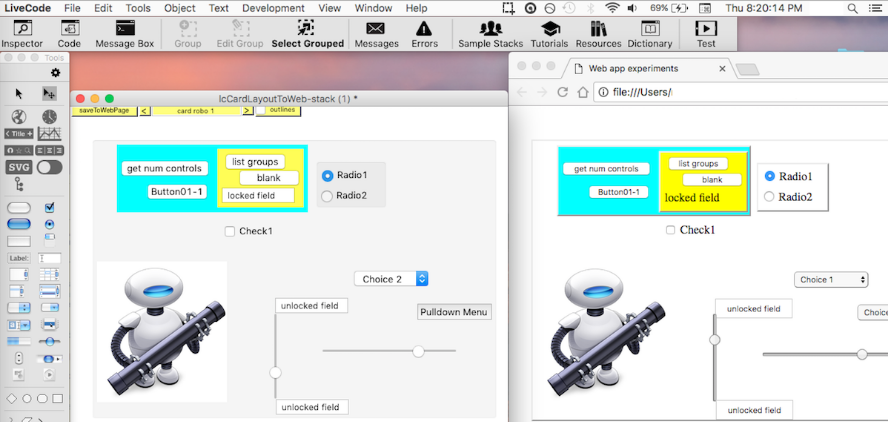
We have been working on our web page design project, lcCardLayoutToWeb, which is posted at GitHub. Here is a screenshot of a test page.

This project allows one to layout a web page in the LiveCode IDE, then export it to HTML and CSS files. The new work makes the process reversible. Exported pages can be edited to include links to Javascript files and references to Javascript functions in HTML events. Then the edited page can be imported into our LiveCode project for further editing of the layout: moving, adding and deleting elements. Then the revised page can be exported back to HTML and CSS files with the file and event references preserved.

This new work should allow us to make interactive web apps more easily.

See our newest Web Lab, “Dynamic diffusion and reaction in a porous solid catalyst” at the Web Labs tab above, Reactors. See the latest version of this web lab in our open-source projects at GitHub, https://github.com/RichardHerz/.